Error Handling Patterns for Audio Processing Services
The 60-Second Timeout: Why Your Audio API's Silent Failures Are Destroying User Trust
Your user uploads an audio file to your API. Your server receives it, starts processing, then... silence. No response. No error message. No progress indicator. Just a hanging connection that eventually times out after 60 agonizing seconds.
The user stares at their terminal, confused. They retry. Same result. They check their file—it plays fine locally. They check their code—the request looks correct. They check their network—everything's fine. Twenty minutes later, after trying different files, different parameters, and different approaches, they finally email support, frustrated and ready to try a competitor.
The response comes hours later: "Your audio file was corrupted. Please upload a valid file."
That's it. No indication of how it was corrupted. No guidance on what "valid" means. No explanation for why it took 60 seconds to fail or why the API never actually told them what went wrong.
This is the error handling failure pattern I see constantly in audio APIs, and it's completely preventable.
Poor error handling doesn't just create support nightmares—it wastes developer time, erodes trust in your platform, and drives users to competitors who actually tell them what went wrong. Audio processing has unique failure modes that generic HTTP error codes don't capture well, and most teams handle them terribly.
Let me show you patterns that turn mysterious failures into actionable feedback that developers can actually use.
Fail Fast: The Golden Rule of Audio Validation
The worst possible error experience is waiting 30 seconds for processing before learning your request was invalid from the start. Every second users wait for a failure they could have known about immediately is time they're growing frustrated with your platform.
Validate Before Processing: Save Time and Resources
Check file format, size, duration, and codec validity before starting expensive transcription or synthesis. Return errors within 100ms, not after 30 seconds of wasted processing.
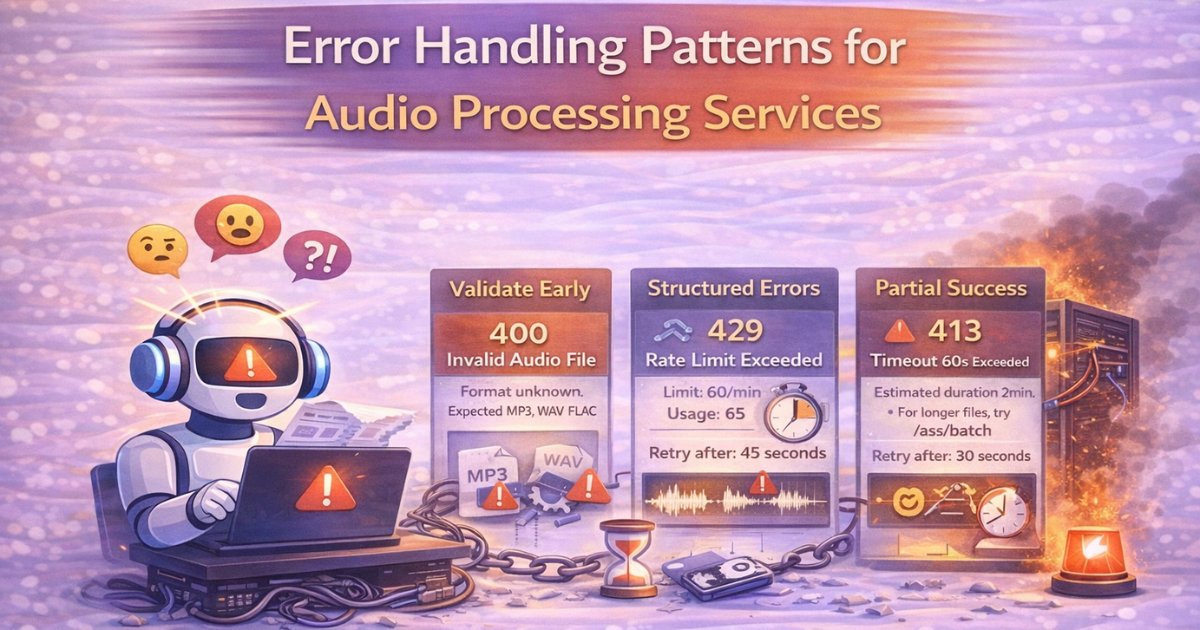
A corrupted audio file should trigger immediate HTTP 400 with specific, actionable guidance:
{
  "error": "invalid_audio_format",
  "message": "Audio file appears corrupted or unreadable",
  "details": {
    "detected_format": "unknown",
    "expected_formats": ["mp3", "wav", "flac", "ogg", "m4a"],
    "file_size_bytes": 2547891,
    "suggestion": "Verify file is valid audio and not corrupted"
  },
  "docs": "https://docs.example.com/audio-formats"
}
Don't just return "invalid file." That tells developers nothing. They don't know if the format is wrong, the file is corrupted, the codec is unsupported, or something else entirely.
This principle is foundational when designing clean audio AI APIs—proper validation prevents developers from wasting time on requests that were never going to succeed.
Enforce Size and Duration Limits Explicitly
When a user uploads a 2-hour podcast episode to an endpoint designed for 60-second clips, failing after 30 seconds of processing is terrible UX. Check duration immediately and fail with clear guidance:
{
  "error": "audio_too_long",
  "message": "Audio duration exceeds maximum limit for real-time endpoint",
  "details": {
    "detected_duration_seconds": 7200,
    "max_duration_seconds": 60,
    "alternative": "Use batch processing endpoint for longer audio",
    "batch_endpoint": "/v1/asr/batch"
  }
}
Return HTTP 413 (Payload Too Large) within milliseconds of receiving the file. The user immediately knows what's wrong and what to do instead. No wasted time. No confusion.
Understanding end-to-end latency breakdown helps you set appropriate validation thresholds—you don't want to accept files that will timeout before processing completes.
Format Detection Failures: Tell Users What You Actually Found
When format detection fails, don't just say "invalid format." Tell users what you detected versus what you expected:
{
  "error": "unrecognized_format",
  "message": "Could not parse uploaded file as audio",
  "details": {
    "detected_mime_type": "application/zip",
    "detected_extension": ".zip",
    "expected_types": ["audio/mpeg", "audio/wav", "audio/flac"],
    "suggestion": "File appears to be a ZIP archive, not raw audio. Extract audio file before uploading."
  }
}
This immediately reveals if they uploaded the wrong file type—maybe they zipped the audio file instead of uploading it directly, or they grabbed the wrong file from their filesystem.
Structured Error Responses: Consistency Is Key
Random error message formats are developer hell. Sometimes you return strings, sometimes objects, sometimes different fields in different error scenarios. Developers can't build reliable error handling around inconsistent responses.
Return consistent error objects with predictable structure across all failure modes:
{
  "error": "machine_readable_code",
  "message": "Human-readable explanation",
  "details": {
    "context_specific_fields": "..."
  },
  "suggestion": "Actionable fix guidance",
  "docs": "https://docs.example.com/relevant-page"
}
Unsupported Language Example
{
  "error": "unsupported_language",
  "message": "Requested language is not supported",
  "details": {
    "requested": "fr-FR",
    "supported": ["en-US", "hi-IN", "ta-IN", "te-IN"]
  },
  "suggestion": "Use one of the supported language codes",
  "docs": "https://docs.example.com/languages"
}
The developer immediately knows what they requested, what's actually supported, and where to find complete documentation.
For systems supporting Indian language ASR, being explicit about language identification and code-switching capabilities prevents confusion about what language combinations are supported.
Rate Limit Error Example
{
  "error": "rate_limit_exceeded",
  "message": "Too many requests",
  "details": {
    "limit": 60,
    "window": "per minute",
    "current_usage": 65,
    "retry_after_seconds": 45
  },
  "suggestion": "Implement exponential backoff or upgrade plan",
  "docs": "https://docs.example.com/rate-limits"
}
Developers can implement proper backoff logic programmatically. They know exactly when to retry and why they hit limits.
Understanding auth, rate limits, and abuse prevention helps you design rate limit errors that protect your infrastructure while guiding legitimate users.
Invalid Parameter Example
{
  "error": "invalid_voice",
  "message": "Requested voice not found",
  "details": {
    "requested": "robot",
    "available": ["Vaanee", "conversational_male", "professional_female"],
    "note": "More voices coming soon"
  },
  "suggestion": "Choose from available voices or use default",
  "docs": "https://docs.example.com/voices"
}
They see what voices actually exist and can fix their code immediately. When supporting code-mixed TTS, voice availability may vary by language pair—make this explicit in error messages.
Partial Success Handling: Don't Discard Good Work
Audio processing isn't always binary success/failure. Long-form transcriptions might partially succeed before encountering errors. Throwing away 10 minutes of successful transcription because minute 11 had issues is terrible UX.
Return Progressive Results with Final Status
For batch processing, return partial results even when complete processing fails:
{
  "status": "partial_success",
  "transcription": "First 10 minutes of successfully transcribed content...",
  "completed_duration_seconds": 600,
  "total_duration_seconds": 720,
  "error": {
    "error": "audio_quality_degraded",
    "message": "Transcription failed after 600 seconds due to severe audio degradation",
    "failed_section": {
      "start": 600,
      "end": 720
    },
    "suggestion": "Consider using noise cancellation service or re-recording degraded section"
  }
}
The user gets value from what succeeded while understanding exactly what failed and why. They don't lose 10 minutes of work.
When handling noisy call center audio, audio quality can degrade dramatically mid-call—partial results with quality warnings are essential for production systems.
Confidence Threshold Warnings
In ASR, low-confidence sections often indicate audio quality problems. Flag these explicitly instead of silently returning questionable results:
{
  "status": "success",
  "transcription": "Full transcription text...",
  "warnings": [
    {
      "type": "low_confidence_section",
      "start_seconds": 45,
      "end_seconds": 60,
      "average_confidence": 0.32,
      "likely_cause": "background_noise",
      "suggestion": "Consider noise cancellation service for better accuracy"
    }
  ]
}
Users understand which sections might need manual review or re-recording. They get transparency about result quality, not blind confidence.
Understanding why aggressive denoising hurts ASR accuracy helps you provide better guidance in these warnings—sometimes the solution isn't more preprocessing, but better source audio.
For customers with audio preprocessing pipelines, these warnings help them tune their preprocessing parameters appropriately.
Network and Timeout Handling: Context Matters
Timeouts happen. Networks fail. Connections drop. How you handle these determines whether users retry appropriately or give up in frustration.
Timeouts with Meaningful Context
Don't just return HTTP 504 Gateway Timeout. Explain what timed out and why:
{
  "error": "processing_timeout",
  "message": "Audio processing exceeded maximum allowed time",
  "details": {
    "timeout_seconds": 60,
    "file_duration_seconds": 120,
    "processed_duration_seconds": 55,
    "reason": "File duration exceeds real-time endpoint capacity"
  },
  "suggestion": "Use batch processing endpoint with webhook notifications for files over 60 seconds",
  "alternative_endpoint": "/v1/asr/batch"
}
Users immediately understand the constraint, how much was processed before timeout, and what to do instead.
When choosing between REST vs streaming APIs, timeout handling becomes even more critical—streaming architectures have different failure modes than request-response patterns.
Retry Guidance: Not All Failures Are Equal
Some failures are retryable (temporary server load, network hiccups), others aren't (invalid file format, authentication failure). Tell developers which is which:
Retryable server error:
HTTP/1.1 503 Service Unavailable
Retry-After: 30

{
  "error": "temporary_overload",
  "message": "Service temporarily unavailable",
  "retryable": true,
  "retry_after_seconds": 30,
  "suggestion": "Retry with exponential backoff"
}
Non-retryable client error:
HTTP/1.1 400 Bad Request

{
  "error": "invalid_sample_rate",
  "message": "Audio sample rate not supported",
  "retryable": false,
  "details": {
    "detected_rate": 96000,
    "max_supported": 48000
  },
  "suggestion": "Resample audio to 48kHz or lower before uploading"
}
Developers can build intelligent retry logic instead of blindly retrying unretryable failures.
WebSocket Disconnection: Enable Graceful Recovery
Streaming connections drop. Network conditions change. Devices switch from WiFi to cellular mid-stream. When WebSocket disconnects mid-processing, don't force users to start over.
Preserve processing state. Let clients reconnect with session tokens and resume from the last successfully received chunk:
{
  "type": "reconnect_info",
  "session_id": "abc123",
  "last_processed_chunk": 47,
  "resume_url": "wss://api.example.com/v1/stream/resume?session=abc123",
  "expires_at": "2025-03-01T10:30:00Z"
}
Users reconnect seamlessly instead of losing progress and restarting expensive processing.
When building real-time audio APIs using WebSockets at scale, graceful reconnection with state preservation becomes critical infrastructure.
Understanding backpressure handling in streaming audio pipelines helps you design error handling that survives real-world network conditions.
For streaming ASR systems, connection recovery with partial result preservation can mean the difference between usable and unusable real-time transcription.
Resource Exhaustion: Be Specific About Limits
When users hit resource limits, vague errors create confusion. Be precise about what limit was hit and how to resolve it.
Credit or Quota Depletion
{
  "error": "insufficient_credits",
  "message": "Not enough credits to process request",
  "details": {
    "required_credits": 50,
    "available_credits": 35,
    "credit_cost_breakdown": {
      "base_transcription": 30,
      "extended_duration": 20
    }
  },
  "suggestion": "Upgrade plan or wait for monthly credit reset",
  "upgrade_url": "https://example.com/pricing"
}
Users know exactly how many credits they need versus have, and where to get more.
Concurrent Request Limits
{
  "error": "concurrent_limit_reached",
  "message": "Maximum concurrent requests exceeded",
  "details": {
    "limit": 5,
    "current_active": 5,
    "queued_requests": 3
  },
  "suggestion": "Wait for existing requests to complete or upgrade to higher tier",
  "active_request_ids": ["req_123", "req_456", "req_789", "req_012", "req_345"]
}
They can check which requests are active and decide whether to wait or cancel something to make room.
Understanding CPU-friendly audio inference techniques helps you set realistic concurrent limits that protect infrastructure without being overly restrictive.
Audio-Specific Error Scenarios
Audio Quality Issues
{
  "error": "audio_quality_insufficient",
  "message": "Audio quality too low for reliable transcription",
  "details": {
    "detected_snr_db": 3.2,
    "minimum_recommended_snr_db": 10,
    "quality_issues": ["excessive_background_noise", "low_volume"],
    "affected_segments": [
      {"start": 10, "end": 25},
      {"start": 45, "end": 60}
    ]
  },
  "suggestion": "Apply noise cancellation or re-record in quieter environment"
}
When dealing with noise cancellation in complex acoustic environments or handling non-stationary noise in Indian environments, specific error messages help users understand preprocessing requirements.
For real-time noise suppression in telephony, quality errors should guide users toward appropriate preprocessing options.
Text Normalization Failures
For TTS systems that handle numbers, dates, and special characters:
{
  "error": "text_normalization_failed",
  "message": "Could not parse ambiguous text elements",
  "details": {
    "problematic_tokens": ["15/03/2025", "₹1,50,000"],
    "suggestions": [
      "Specify date format explicitly or use ISO format (2025-03-15)",
      "For Indian numbering, format as '1,50,000' with explicit locale"
    ]
  },
  "suggestion": "Provide clearer formatting or specify locale parameter"
}
Model Versioning Issues
When versioning audio models, clear errors help customers migrate smoothly:
{
  "error": "model_version_deprecated",
  "message": "Requested model version no longer supported",
  "details": {
    "requested_version": "v1",
    "sunset_date": "2025-01-15",
    "current_version": "v2",
    "migration_guide": "https://docs.example.com/v1-to-v2-migration"
  },
  "suggestion": "Upgrade to v2 for continued service"
}
Best Practices Summary: What Actually Works in Production
Validate early and fail fast. Check everything before starting expensive processing. Return errors within 100ms, not 30 seconds.
Structure errors consistently. Every error should have machine-readable codes, human messages, detailed context, suggested fixes, and documentation links.
Distinguish error types clearly. Client errors (don't retry), server errors (retry with backoff), rate limits (retry after specified time). Make retryability explicit.
Preserve partial success. Return completed work even when later stages fail. Provide warnings about questionable quality sections.
Guide users to solutions. Every error should explain both what went wrong and how to fix it. Link to relevant docs. Suggest alternative endpoints.
Handle network reality gracefully. Expect disconnections. Enable reconnection. Preserve state. Don't force restarts.
The Path Forward: Failures Are Inevitable, Confusion Isn't
Great error handling transforms failures from frustrating mysteries into quick fixes. Developers debug themselves instead of waiting hours for support responses. Your support queue shrinks dramatically. User satisfaction increases even when things go wrong.
Because in production systems, errors are inevitable. Network conditions fail. Files get corrupted. Limits get exceeded. Users make mistakes.
But confusion is optional. Wasted time is optional. Frustration is optional.
Clear, actionable, consistent error handling is a choice—a choice that separates amateur APIs from professional platforms developers actually want to use.
Build error responses that respect developers' time and intelligence. Tell them what went wrong, why it matters, and how to fix it. Every single time.
Whether you're building your own TTS pipeline or building low-latency streaming systems, error handling should be a first-class architectural concern, not an afterthought.
Because the quality of your error messages says more about your platform than the quality of your models.